3D VFSA inversion
The 3D inversion uses the same idea as 2D VFSA: a random search that moves a set of control points and slowly cools. Every step needs a 3D forward run, and these are done by ModEM in parallel with MPI.
In 3D each run is a single chain. To get an ensemble, we run several jobs with different random seeds and combine their results afterwards.
You need ModEM
Install ModEM (Mod3DMT) compiled with MPI, together with an MPI runtime such as OpenMPI or MPICH. The inversion launches it with the command you set in mpirun_cmd (mpirun or srun).
Run the example
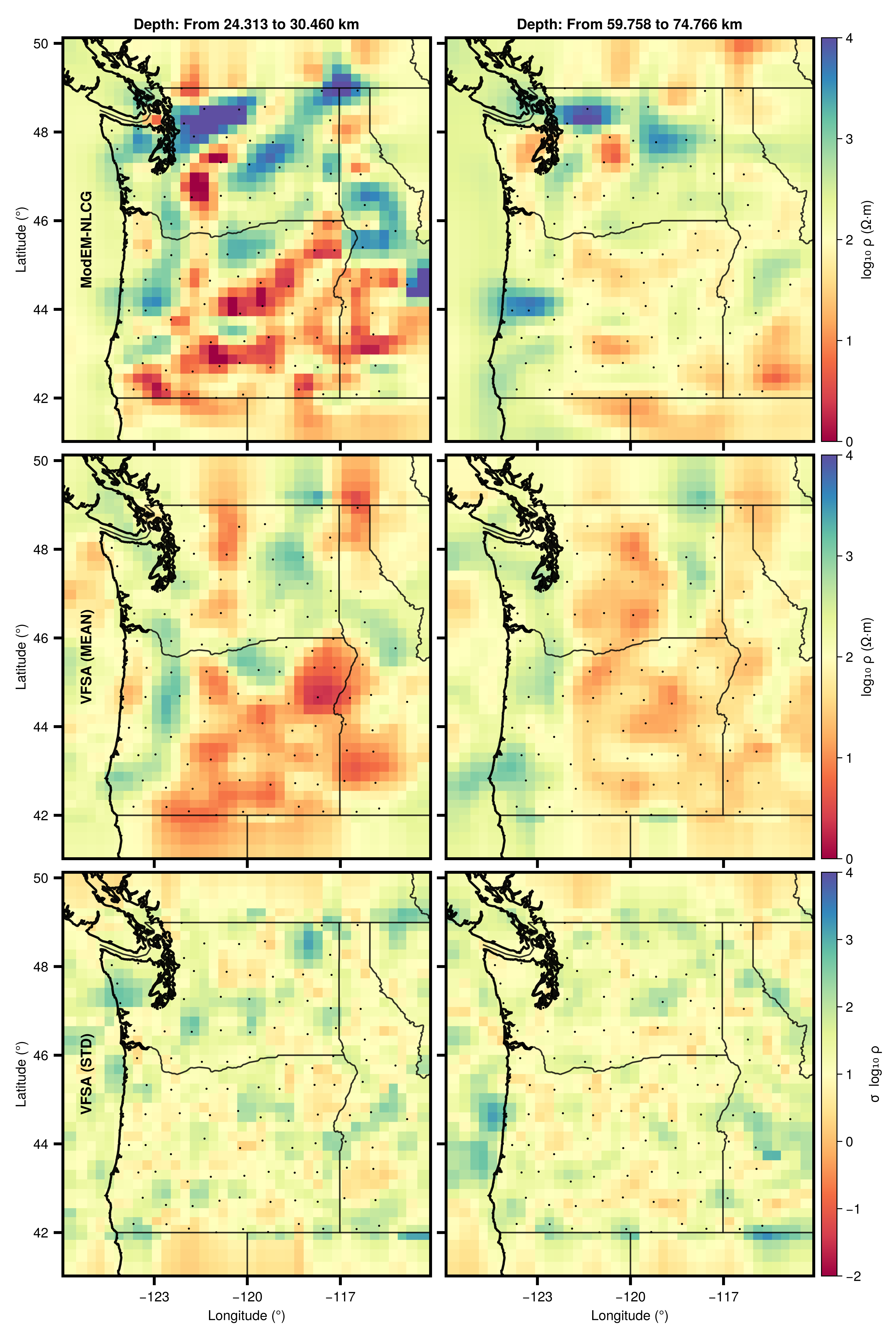
examples/run_vfsa3D.jl runs the inversion on the Cascadia data (see Example data at the end of this page). Open the script first and set the path to your ModEM executable and data at the top. Then:
julia --project=. examples/run_vfsa3D.jl 1911 # the argument is the random seedFrom Julia
The settings are collected in a VFSA3DMTConfig. There are no hidden defaults: most fields must be given, so the easiest start is to copy the one in examples/run_vfsa3D.jl and change what you need. A shortened version:
using MTGeophysics

cfg = VFSA3DMTConfig(
    nprocs       = 21,                   # MPI processes for ModEM
    mpirun_cmd   = "mpirun",
    modem_exe    = "Mod3DMT",
    out_root     = "run",                # run folder: run_<timestamp>, next to the start model
    n_ctrl       = 900,                  # control points
    log_bounds   = (0.0, 4.0),           # search range in log10 Ω·m
    max_iter     = 3000,
    T0           = 0.03,                 # start temperature
    cool_ratio   = 1e-3,                 # final temperature = T0 × cool_ratio
    target_rms   = 1.0,
    seed         = 1911,
    # ... see examples/run_vfsa3D.jl for the remaining fields
)

best_model_path, log_path = VFSA3DMT("start.rho"; dobs_path = "data.dat", cfg = cfg)
The main settings
| Setting | What it controls |
|---|---|
n_ctrl | number of control points; more allows more detail but slows the search |
log_bounds | the resistivity range the search may explore |
max_iter, T0, cool_ratio | the length of the run and how fast it cools |
z_core_cells or z_core_skin_depths | how deep the model may change; deeper cells only serve the forward solver |
bathymetry_file | sea cells that stay fixed (see 3D meshes) |
distortion_mode | :on corrects each site for galvanic distortion while fitting |
fwd_ctrl | ModEM's forward control file; worth setting, since solver defaults differ between ModEM builds |
All fields are listed in the control file reference.
Build an ensemble
Submit several jobs with different seeds, for example one per SLURM job. Then compute the ensemble statistics from all runs below a folder:
mean_path, median_path, std_path = AnalyseEnsemble3D("runs")This searches runs/ for best_model.rho files and writes model.mean, model.median and model.std there.
What you get
run_<timestamp>/
├── best_model.rho             best model of the chain
├── 0vfsa3DMT.log              one line per iteration
├── 0vfsa3DMT_detailed.log     one line per trial model
└── distortion_best.txt        per-site distortion (with distortion_mode = :on)
Example data
The Cascadia example is not included in the package. Download it from ModEM-Examples and place it in examples/cascadia/.